Markdown
Clean portable Markdown for docs, repos, and editor handoff.
Review and polish
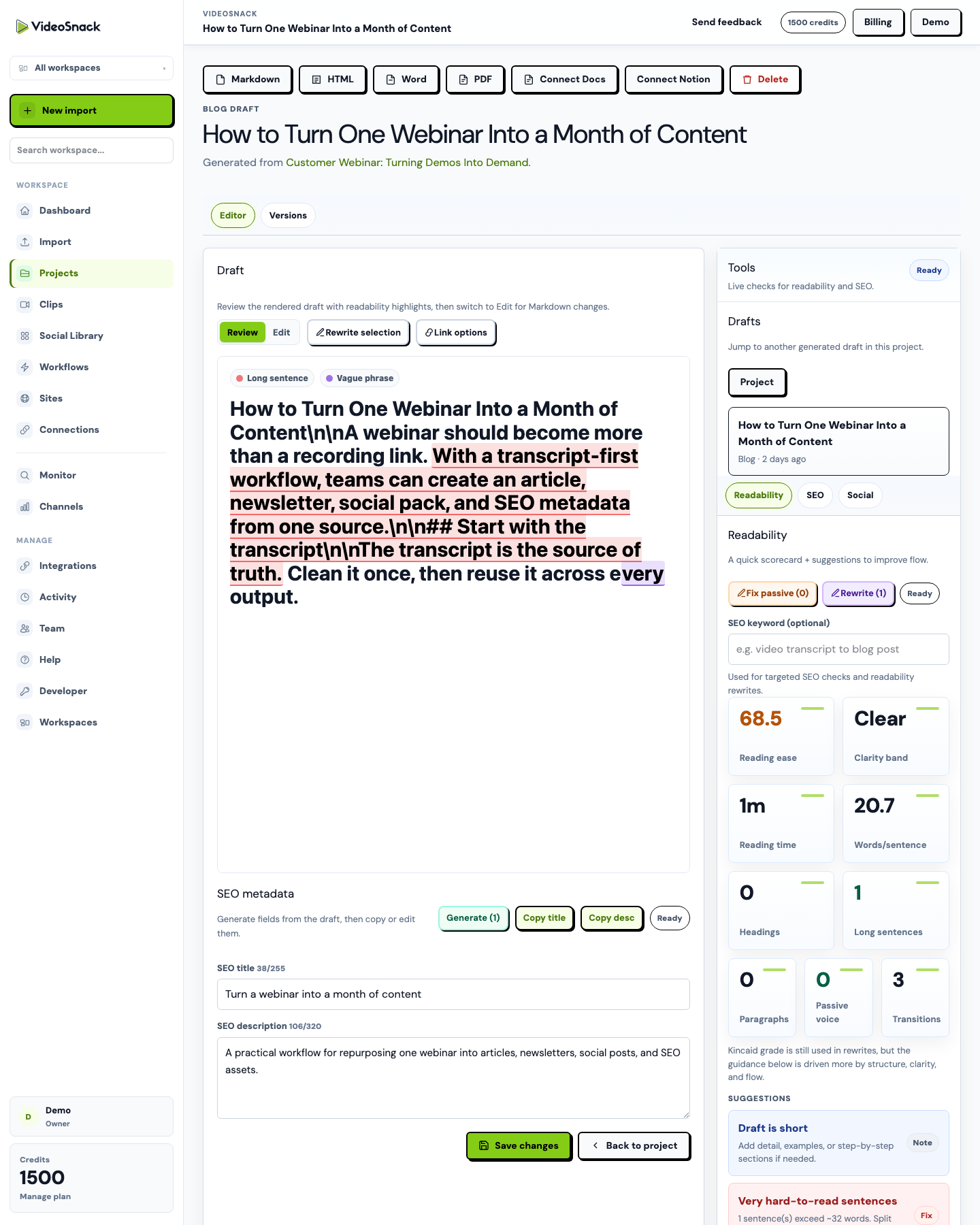
The editor is where generated drafts become publishable assets. Review the rendered draft, edit Markdown directly, generate SEO fields, rewrite selected sections, compare versions, and prepare the final output.
What it does
This feature fits into the same source-to-publish workspace, so teams do not need to rebuild the handoff for every recording.
Export formats
Manual editing stays free of credit usage, and finished drafts can leave VideoSnack in practical formats for review, publishing, or archive.
Clean portable Markdown for docs, repos, and editor handoff.
Publish-ready HTML for CMS workflows and technical review.
Document export for teams that review in traditional files.
Shareable final files for client delivery and approval.
Send drafts into Google Docs for collaborative editing.
Download transcript captions when timing data is available.
Who uses it
VideoSnack is built for teams that already have recordings, shows, demos, or market discoveries and need a cleaner way to turn them into publishable assets.
This role benefits when the same workflow can be repeated across many recordings, clients, or publishing destinations.
This role benefits when the same workflow can be repeated across many recordings, clients, or publishing destinations.
This role benefits when the same workflow can be repeated across many recordings, clients, or publishing destinations.
Real use cases
These examples are based on the actual source-to-publish workflows VideoSnack supports today.
An editor reviews the rendered draft, rewrites a weak intro, and generates SEO metadata before publishing.
A marketing manager compares an older version after a rewrite changed the angle too much.
An agency adds links and images before exporting the final draft to Google Docs for client review.
Product view
This screenshot is from the current VideoSnack app, using demo content to show how the feature appears in context.
Typical flow
Use the feature as a step in a manual project, a saved workflow, or an automated content production process.
Start the work from the right source.
Keep the project connected to the same workspace.
Keep the project connected to the same workspace.
Move the finished asset forward.
Outcomes
The value is not just creating one asset faster. It is making the next recording easier to process, review, and publish.
Related use cases
Use-case pages show the same workflow from the perspective of a role, industry, or source content type.
Start a free trial with 100 credits and test the full video-to-content workflow.